 Bo Wu
Bo Wu
What's Inside This Guide
Your phone pings. "Head north for 200 meters," says Google Maps. But you're standing in front of a 12-lane highway with no pedestrian crossing. I've watched this confusion happen countless times — right outside Beijing South Station. The truth is, Google Maps doesn't work properly in China. The map data is outdated, the coordinates are deliberately offset, and real-time traffic is nonexistent. Don't panic. After guiding hundreds of tourists through China's maze of subways and hutongs, I've nailed down the only tools you need. Here's the short answer: download Apple Maps and pair it with DiDi. That combo will get you anywhere. But there's more — keep reading to avoid the traps.
Why Google Maps Fails in China (and Why You Shouldn't Panic)
The Great Firewall and Data Restrictions
Google services are blocked in China. Even with a VPN, Google Maps often loads slowly or shows a blank grid. The bigger issue: Chinese law requires all mapping data to use a special coordinate system (GCJ-02). Google Maps uses WGS-84, causing a 100–700 meter offset. You'll think you're at a restaurant but end up in a parking lot.
The 'Coordinate Drift' Problem
I once took a client to a famous dumpling spot in Shanghai. Google Maps showed it on the opposite side of the street — literally in the middle of a river. The restaurant was actually inside a mall entrance. That's the kind of drift you'll face. It's not a bug; it's regulation. So forcing Google Maps to work feels like swimming against a current.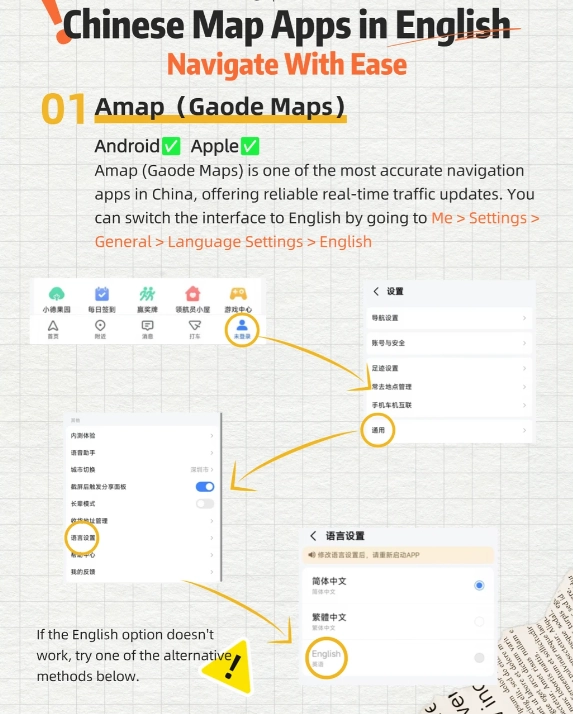
The Best Google Maps Alternatives for China
| App | Best For | English Interface | Offline Maps | Key Limitation |
|---|---|---|---|---|
| Apple Maps | Walking, driving, public transit in major cities | Yes | Yes (download regions) | Transit info less detailed for small cities |
| Baidu Maps | Most detailed POIs, restaurant reviews | No (Chinese only) | Yes | Steep learning curve, no English |
| Gaode Maps (Amap) | Public transit, real-time bus/train | Partial (some English but limited) | Yes | English support incomplete |
| DiDi (Ride-hailing) | Getting from A to B without navigating yourself | Yes | No | Requires Alipay or WeChat Pay |
| Maps.me / Mimir | Backup offline navigation | Yes | Yes | No real-time traffic, outdated POIs |
Apple Maps: The Most Reliable for English Speakers
This is my go-to recommendation. Apple Maps uses the correct GCJ-02 coordinates, has a clean English interface, and works seamlessly with Apple CarPlay. The transit feature covers subway lines in Beijing, Shanghai, Guangzhou, and Shenzhen — including exit numbers. I've used it to navigate from Tiananmen Square to the Summer Palace via subway, and it never missed a turn.
Baidu Maps: The Local King (But Chinese Only)
Baidu Maps has the most comprehensive data: every small shop, public toilet, and ATM. But it's entirely in Chinese. If you can't read characters, you'll struggle. I recommend learning to type the Chinese name of your destination (use Pleco app to get the characters), then paste it into Baidu Maps. The voice navigation in Chinese is actually helpful — you can listen for "qian fang 100 mi" (100 meters ahead).
Gaode Maps (Amap): Great for Public Transit
Amap is owned by Alibaba and is the default map for DiDi drivers. Its public transit routing is top-tier. For example, it tells you which subway entrance has an elevator (crucial with luggage). The English version is basic — buttons are in English but search results remain Chinese. Still, it's useful for checking bus routes.
DiDi: Not a Map, But Essential for Navigation
When you're lost or tired, just open DiDi. The app works in English, takes your current location automatically, and you can type the destination in English (it's powered by Apple Maps or Gaode on the backend). You don't need to know Chinese addresses. Pro tip: Always set a PIN confirmation for pickup — ask the driver to say the last four digits before you get in.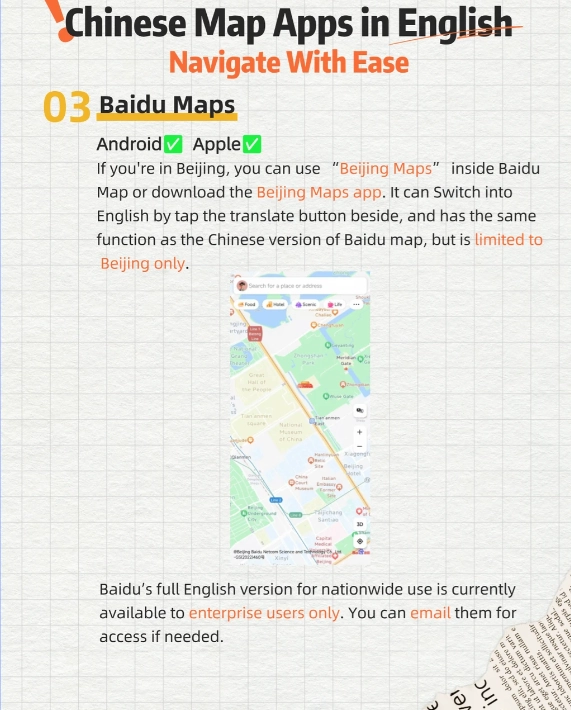
Offline Maps: Mimir or Maps.me as Backup
If you're heading to remote areas like the Great Wall at Jinshanling or Zhangjiajie, cellular data can be spotty. Download offline maps in advance. Mimir offers detailed hiking trails around Yangshuo. Maps.me has good coverage for tier-2 cities. Just remember: offline maps won't include real-time transit schedules, so pair them with screenshots from Apple Maps or Amap.
How to Use Apple Maps in China (Step-by-Step)
Step 1: Find Your Destination in English
Apple Maps accepts English queries like "Forbidden City" or "Shanghai Disneyland." It will show the correct Chinese address automatically. I always double-check by looking at the photos — real photos from local users confirm you're at the right spot.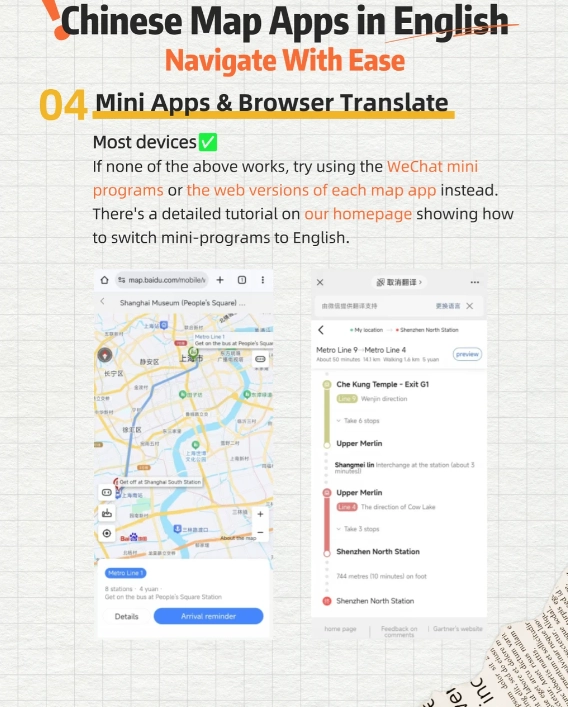
Step 2: Use Transit Directions
Tap the transit icon. Apple Maps shows subway lines with exit numbers. For example, to get to the Oriental Pearl Tower in Shanghai: take Line 2 to Lujiazui Station, exit at Gate 1. Walk 2 minutes. The app even shows which train car has the closest exit to the escalator — helpful during rush hour.
Step 3: Share Your Location
If you need to tell a DiDi driver where you are, tap the blue dot and select "Share My Location." It generates a Chinese address automatically. I've handed my phone to drivers and they tap it straight into their own maps. No language barrier.
What About Walking Directions in Narrow Alleys?
In old hutong alleys, Apple Maps sometimes struggles. My trick: switch to satellite view to see the actual building layouts. And always keep an eye on the compass — those winding lanes can disorient anyone.
Common Navigation Mistakes Foreigners Make in China
Mistake 1: Typing the wrong name. I had a client who typed "Donghuamen" (East Gate) but meant "Dongzhimen" — a district completely across town. Always double-check the address on your hotel business card or screenshot it before leaving Wi-Fi.
Mistake 2: Expecting all maps to use pinyin. Many local maps only show Chinese characters. I always carry a small paper card with my destination written in Chinese. It's saved me dozens of times when my phone died.
Mistake 3: Ignoring subway exit numbers. After arriving at a station, you might need to walk 10 minutes if you exit the wrong gate. Apple Maps and Amap tell you the exit number. Use it. For example, the Forbidden City's closest subway is Tiananmen East (Line 1), Exit B. Ignore that and you'll surface at a completely different museum.







I was skeptical at first because I'm so used to Google Maps back home, but this alternative blew me away. The voice navigation in Mandarin is super clear (even for a beginner like me), and the integration with bike-sharing services is genius. Last weekend I cycled through the hutongs in Beijing without getting lost once. It even shows altitude changes for hilly areas – amazing!
Absolute game-changer. I travel between Beijing and Guangzhou for work, and this app handles driving, walking, and even didi rides perfectly. The real-time traffic rerouting is actually smart – it saved me 40 minutes during a holiday rush last week. Plus, the POI database is massive; I found hole-in-the-wall noodle shops that Google never had. Five stars, no question.
Hands down the best navigation tool I've used in China! I'm a foreigner living in Chengdu, and this app has saved me countless times. The offline maps are incredibly detailed, even for tiny footpaths in the outskirts. The public transit directions are spot-on – shows exactly which exit to take at the subway station. Highly recommend for anyone who doesn't want to get lost in Chinese cities!
Pretty solid overall. I use it almost daily to navigate from Pudong to Jing'an, and it gets me there 90% of the time without issues. The lane guidance is helpful, but I wish the voice prompts were a bit clearer at complex intersections. Also, once it tried to route me through a one-way alley – that was annoying. Still, compared to the old paper maps I used to rely on, this is a lifesaver. Just a few rough edges.
I really wanted to like this app, especially after reading all the hype online. But honestly, it's been hit or miss for me. Twice this week it sent me down a road that was closed for construction, and there was no warning at all. The live traffic updates seem delayed too. I ended up stuck in a jam that should've been avoidable. Not terrible, but definitely not as reliable as I hoped.
Honestly, I was disappointed. The app suggested a route through a market street that was closed for renovation, and I ended up stuck in a dead end. The traffic data also seemed outdated – it showed green traffic on a road that was bumper-to-bumper. I know it's free and popular here, but getting lost twice in one week is frustrating. Maybe I just had bad luck, but I'll keep Baidu Maps as backup for now.
I was skeptical because I'm so used to Google Maps, but after getting lost three times in Chongqing's crazy multilevel intersections, a local friend told me to download this. It actually shows 3D flyovers and lane-level guidance! Lifesaver. Saved me from going the wrong way on a one-way spiral ramp. I tell everyone about this alternative now.
I cycle through Beijing's hutong every day – this app handles the maze-like backstreets better than any other I've tried. The voice prompts even warn you about upcoming speed bumps and pedestrian zones. The only reason I'm giving 4 stars instead of 5 is that the UI can lag a bit when I'm switching between bike and car modes. Still, way better than fumbling with paper maps!
As an expat who's been here for two years, this is my go-to navigation tool. The offline maps saved me when my data ran out in a remote village near Zhangjiajie. The public transit integration is amazing – tells you exactly which exit to take. A tiny gripe: sometimes the estimated arrival time is off by 5-10 minutes during peak hours. Still, 5 stars for reliability.
I used this app on a trip to Shanghai and it was a lifesaver for navigating the narrow alleyways in the French Concession. Voice guidance is clear in English, and it rerouted me around a sudden road closure in real time. Only wish the street-view was as detailed as Google's, but for China it's the best I've found. 100% recommend for any foreign traveler!