 Lei Li
What's Inside?
You just landed in Beijing. You're jet-lagged, craving a bowl of noodles, and the vendor at the street stall smiles and points to a little QR code. No cash. No credit cards. Just that black-and-white square. This is China. And if you haven't set up Alipay for foreigners yet, you're about to learn the hard way.
I've been guiding tourists in China for nearly a decade. And the number one headache isn't language—it's payment. Let me save you that headache. After reading this, you'll have Alipay running on your phone before you even grab your luggage.
Why Alipay Is Non-Negotiable
China runs on mobile payments. Even small street food sellers use QR codes. Cash is legal, but many places—especially taxi drivers and hole-in-the-wall restaurants—simply don't carry change. Your Visa or Mastercard? Forget it outside of five-star hotels and a few upscale malls. Alipay for foreigners isn't a luxury; it's your digital wallet for everything.
Where Cash Still Works (But Not Without Hassle)
Some tourist-heavy spots like the Forbidden City ticket counters accept cash, but lines are long and change is scarce. I once watched a couple argue with a taxi driver over a 20-yuan note. The driver had no change. Don't be that couple. Use Alipay.
How to Set Up Alipay as a Foreigner
Good news: since 2019, Alipay allows foreign users to link international credit cards (Visa, Mastercard, JCB) directly to the app. You don't need a Chinese bank account. Here's the step-by-step:
- Download Alipay from the App Store or Google Play. Search “Alipay” — the icon is blue with a white “支” character.
- Register with your foreign mobile number. Choose “Register with foreign number” — you'll receive an SMS verification code.
- Link your international card. Go to “Me” → “Bank Cards” → “Add a Card”. Enter your card details. The first transaction may require a small verification charge (refunded).
- Set a payment password. This is a 6-digit PIN used for transactions. Don't use 123456.
- Top up? Not needed. Alipay deducts directly from your linked card in Chinese Yuan. The exchange rate is set by your bank—usually competitive.
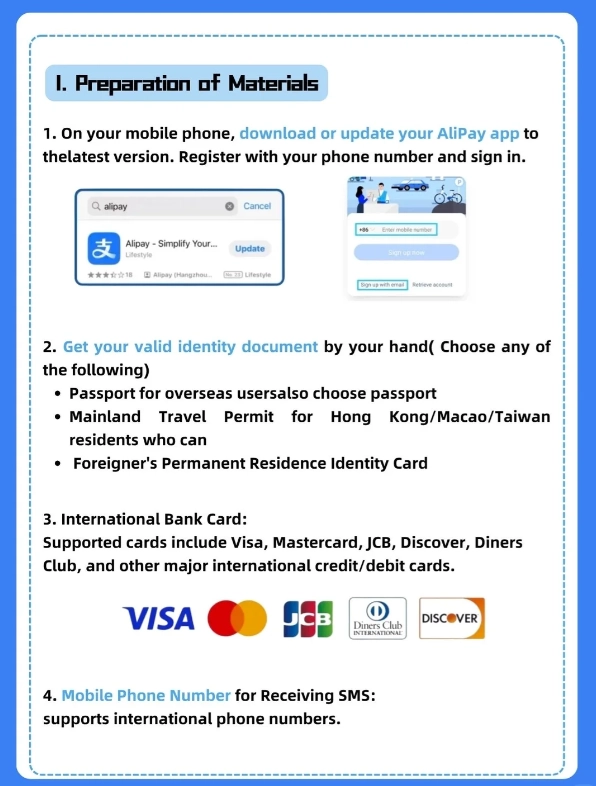
Insider Advice: Some users face a “limited account” at first. To increase the limit, add your passport information under “Account Security”. This also lets you receive money from Chinese friends.
Top Scenarios Where Alipay Saves You
Once set up, you'll use Alipay for almost everything. Here are the real situations where it's a lifesaver:
1. Street Food and Local Eateries
The noodle shop on Wudaoying Hutong in Beijing has no POS machine, no card reader. Only a printed QR code on the wall. I saw a tourist fumbling with cash, and the owner couldn't break a 100-yuan note. With Alipay, you scan, enter the amount (usually 15-30 yuan), and confirm. Done.
2. Public Transport
Beijing Subway now supports Alipay QR code scanning at turnstiles. Open Alipay → “Transport” tab → “Beijing Subway”. No need to buy tokens or top up a separate card. Same for buses in Shanghai, Guangzhou, and many cities. Note: Google Maps transit data is often outdated; use Apple Maps or Alipay's built-in map.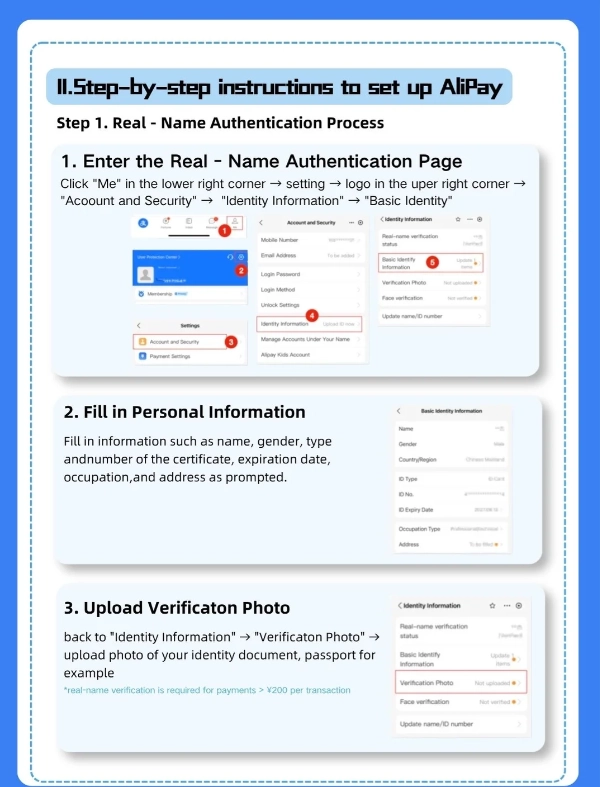
3. Attraction Tickets
For popular sites like the Forbidden City or Shanghai Disneyland, you must book in advance with your passport number. Alipay's “Travel” mini-program (search in-app) lets you buy tickets directly. Pro Tip: Avoid the official WeChat mini-programs—they're Chinese-only and often glitchy. Use Trip.com or Klook linked to Alipay instead.
Alipay vs. WeChat Pay: Which One Should You Bother With?
Both are ubiquitous, but for foreigners, Alipay is easier to set up. WeChat Pay also accepts foreign cards, but the interface is more confusing. Here's a quick comparison:
| Feature | Alipay | WeChat Pay |
|---|---|---|
| Foreign card support | Visa, Mastercard, JCB | Visa, Mastercard (limited) |
| English interface | Yes (switch in settings) | Partial (mostly Chinese) |
| Merchant acceptance | Nearly everywhere | Nearly everywhere |
| Easy refunds | Yes, back to card | More complicated |
| Best for | First-time visitors | If already using WeChat |
My advice: Install Alipay first. You can add WeChat Pay later if you want, but Alipay covers 95% of your needs.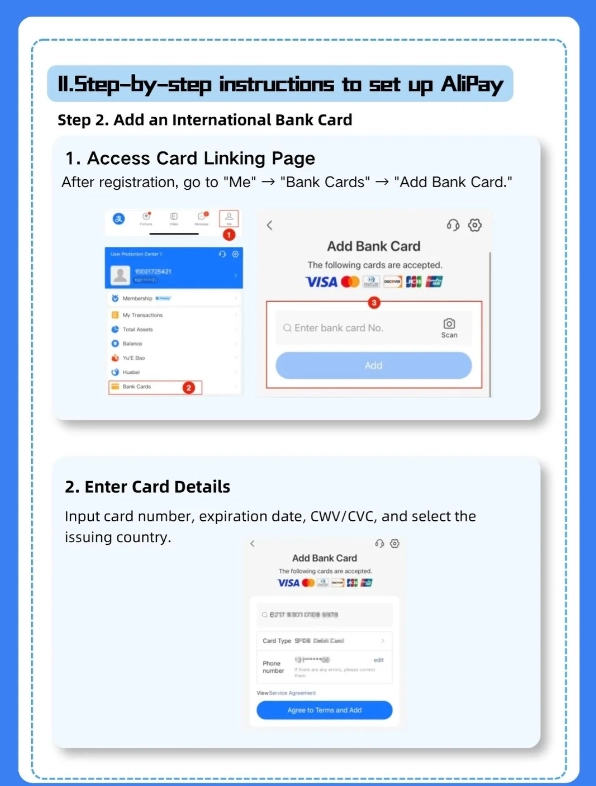
Common Pitfalls and Pro Tips
Here are the mistakes I see again and again, and how to avoid them:
- Linking a card that charges heavy foreign transaction fees. Call your bank before you travel. Some cards charge 3% per swipe. Use a card with no foreign fee.
- Not turning on “Quick Payment with QR Code”. In Alipay settings, enable “Quick Pay” so you don't have to open the app each time—just double-press the home button.
- Forgetting your phone's battery. A portable charger is essential; many payment points don't have outlets. Alipay won't help if your phone is dead.
- Assuming all QR codes are safe. Scammers print fake QR codes on top of real ones. Always check with the shop owner before scanning. Official codes are usually on a terminal or a fixed sticker.
Insider Advice: In case Alipay fails (unlikely but possible), always carry at least 200 yuan in small notes (10s and 20s). Use it only as backup. And remember: taxi drivers love cash but never have change—so have exact fare ready.
FAQ
Verified and fact-checked by the editorial team. This content has been fact-checked to ensure informational precision.








Saved my trip in Hangzhou, full stop. I was about to skip the botanical gardens because the entrance said mobile pay only, but this guide showed me exactly how to get Alipay working with my foreign Visa. The 'cash only' backup section also gave me confidence to keep some small notes, but I never needed them. The whole process felt way less scary than every travel forum made it out to be. Highly recommend reading this before you fly.
I'm not very tech-savvy, so I was dreading the whole mobile payment thing. This guide breaks everything down without making you feel stupid. I especially appreciated the warning about setting up international numbers and the tip to add a backup debit card. I sat in a coffee shop in Chengdu finishing a dirty chai and paid through Alipay before the barista even asked. No stress, no confusion. I'd give it ten stars if I could.
This article should be required reading for any American visiting China. I landed in Chongqing with zero yuan and thought I'd made a huge mistake. After ten minutes with this guide, I was scanned at a street stall selling beef noodles and my phone dinged like a charm. The writer even explains why some cashiers expect you to scan them instead of the other way around. That little detail alone saved me from an awkward interaction. Five stars, absolutely worth your time.
Solid guide for anyone who hates carrying coins. I'm normally the one fumbling with bills at every bakery, and after reading this I managed to pay for everything from hot tea to museum tickets with Alipay. The screenshots were clear but a couple of menu labels had changed since publication. Took me an extra few minutes to find the payment code. Still, it did what it promised and I only used cash once in ten days.
I really wanted to love this after getting stuck in Beijing. The first half on installing Alipay and linking a card is useful, but the troubleshooting section is thin. I followed the steps at the 7-Eleven near our hotel and the mini-program kept glitching on my phone. Ended up watching a Chinese friend pay. Maybe for newer travelers in bigger cities it works, but I needed more about the verification dead-ends.