 Hui Lin
- Why Is Baidu Maps the Only Map App That Works in China?
- How Do You Set Baidu Maps to English on Your Phone?
- Step-by-Step: How Do You Navigate with Baidu Maps?
- What Do You Do When Baidu Maps Fails You?
- My Insider Tips for Using Baidu Maps in English Like a Local
- Frequently Asked Questions About Baidu Maps in English
You just touched down in Beijing, and your phone is useless. Google Maps shows a giant blank spot. Your taxi driver is yelling in Mandarin, and you have no idea where you're going. I've seen this scene repeat at least a hundred times. The truth is, foreigners panic because they're stuck with tools that don't work here. The solution is simple: using the Baidu Map app in English. It's not perfect, but it's the only real map app that understands China's streets. Here's my blunt take: Baidu Maps in English isn't just helpful—it's a survival tool. But you need to set it up correctly before you leave the hotel Wi-Fi. Otherwise, you'll be stuck at the subway entrance like every other lost tourist.
In this guide, I'll walk you through everything—from setting up the English interface to navigating your first route, plus all the sneaky workarounds I've discovered after years of guiding tours. Let's dive in.
Why Is Baidu Maps the Only Map App That Works in China?
Here's the thing: Google Maps is banned from collecting detailed map data in China. That's why you'll see roads floating in the void if you try to use it. Apple Maps, which relies on Google for China, has the same problem. So you're left with two homegrown options: AMap (高德地图) and Baidu Maps (百度地图). Both have English versions, but for a foreign tourist, Baidu Maps wins every time. Why? Its English interface is more polished, and it covers even remote areas with stunning accuracy. And here's a pro tip: many Chinese locals use Baidu Maps, so the data is constantly updated by millions of users.
I can't count how many times I've had to rescue clients who were convinced their international GPS would work. It doesn't. Even if you have an international SIM card, without a Chinese map app, you'll be lost.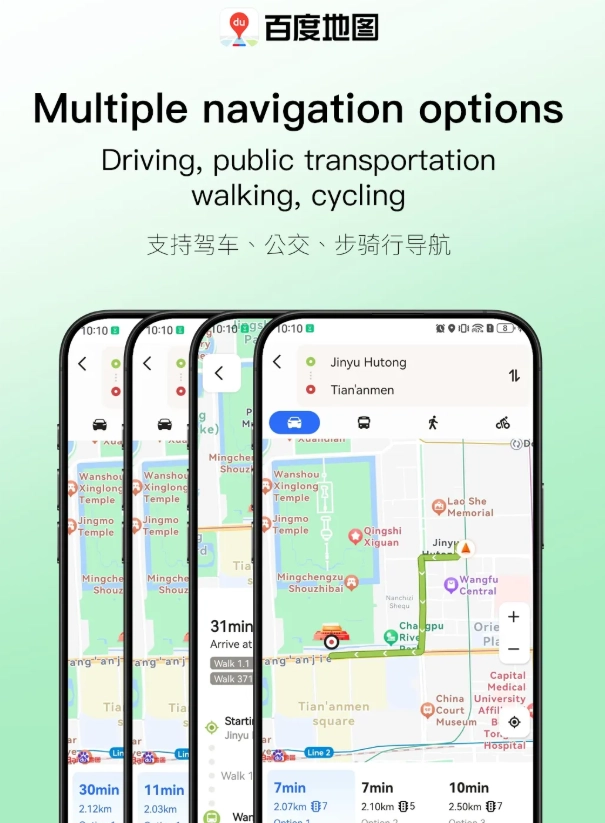
| Feature | Baidu Maps (English) | Google Maps | Apple Maps |
|---|---|---|---|
| Accurate in China | Yes | No | No |
| English interface | Yes | N/A | N/A |
| Transit integration | Excellent | None | None |
| Offline maps | Yes | No | No |
| Cost | Free | N/A | N/A |
How Do You Set Baidu Maps to English on Your Phone?
Now, let me save you the headache I've seen tourists go through at the airport. Setting up Baidu Maps in English only takes three minutes, but you have to do it while you still have Wi-Fi. Here's the exact process:
- Download the app before you land. Search for "Baidu Map" in the App Store or Google Play. The icon is a blue compass with a white "B". Do this before you arrive if possible.
- Create a Baidu account. You can use your email to sign up, but if it asks for a phone number, grab a cheap Chinese SIM card at the airport—they're available at vending machines in major hubs like Beijing Capital Airport. Or, use any phone number; international numbers sometimes work, but don't count on it.
- Switch the language to English. Once you're in, tap on the "我" (Me) button at the bottom right corner. Scroll down to "设置" (Settings), find "语言" (Language), and select "English". If you can't find it, update the app first.
- Grant location permissions. It will ask to access your location. Allow it, obviously.
- Download offline maps. While on Wi-Fi, tap on the map menu icon (usually a compass) and select "下载离线地图" (Offline Maps). Choose the cities you'll visit. This is a lifesaver when your data runs out.
Pro Tip: If you can't find the English language option, check whether you accidentally downloaded a third-party clone. The real Baidu Maps has over 100 million downloads.
Step-by-Step: How Do You Navigate with Baidu Maps?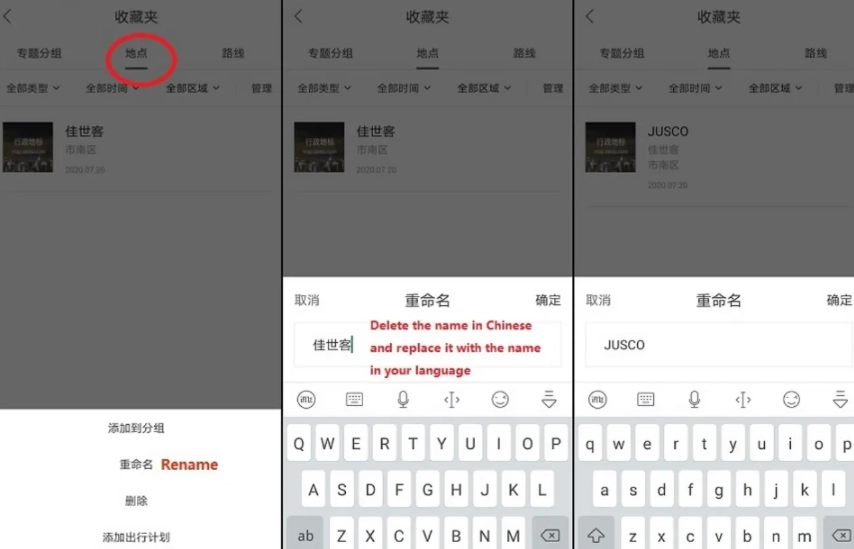
Okay, you're set up. Now comes the fun part—actually using it. Let's pretend you want to get to the Forbidden City from your hotel near Wangfujing. Here's how I'd do it:
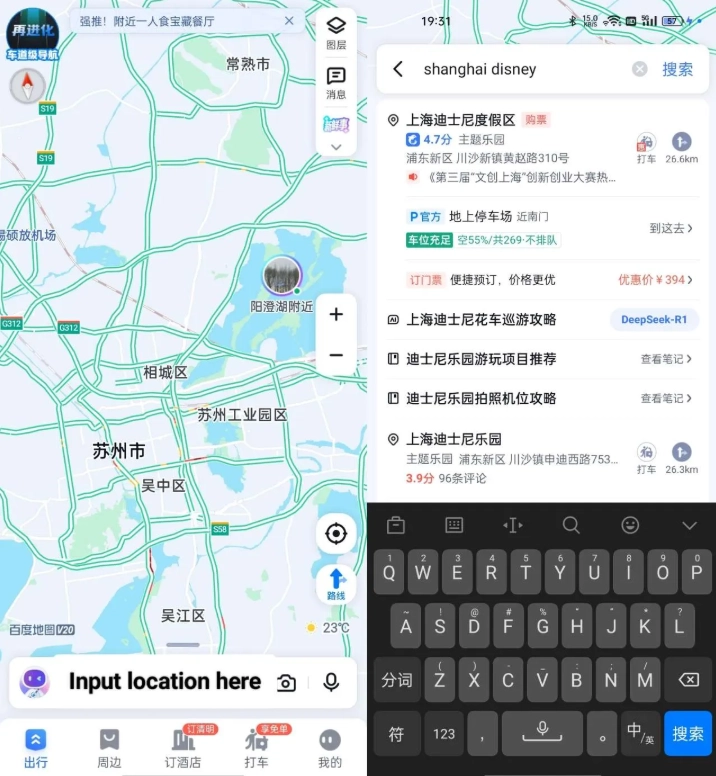
- Type the destination. In the search bar, type "Forbidden City" or "故宫". If you use English, the app will still find it. But for lesser-known spots, copy-paste the Chinese characters from a translation app.
- Hit "路线" (Directions). It's the big button with a compass icon.
- Choose your mode. You'll see options for "驾车" (Driving), "公交" (Transit), "步行" (Walking), and "骑行" (Cycling). Tap "公交" for public transport.
- Review the route list. Baidu Maps will show you multiple options, with estimated time and fare. Tap the fastest one.
- Start navigation. The app will give you step-by-step instructions. Note: The voice prompts are currently in Mandarin, but the on-screen text is in English. So keep your eyes on the screen.
One thing that trips up many tourists: The app uses "站" (station) and "号线" (Line) for subway. For example, you might see "乘坐4号线到西直门站". That means "Take Line 4 to Xizhimen Station."
What Do You Do When Baidu Maps Fails You?
Let's be real—no app is perfect. Here are the common failures I've encountered, and how to fix them:
- Your location is a blue dot wandering around. This usually happens indoors. Step outside and wait for your GPS to lock on.
- Search results show nothing when you type in English. Try copying the Chinese name from your translation app. Or use the address, like "东城区景山前街4号".
- You can't download offline maps. Check your Wi-Fi connection and storage space.
- The app asks for payment to use transit? Actually, Baidu Maps itself is free, but when you use the "乘车码" (transit QR code) for buses/subways, you need to link a payment method. You can link your Alipay or WeChat Pay. Set that up in the app's payment section, or better, set up Alipay and WeChat Pay before you leave home.
Here's the catch: If your Alipay isn't linked to a Chinese bank card, you might not be able to use the QR code feature. But you can always buy a physical transit card at any metro station with cash. That's the fallback.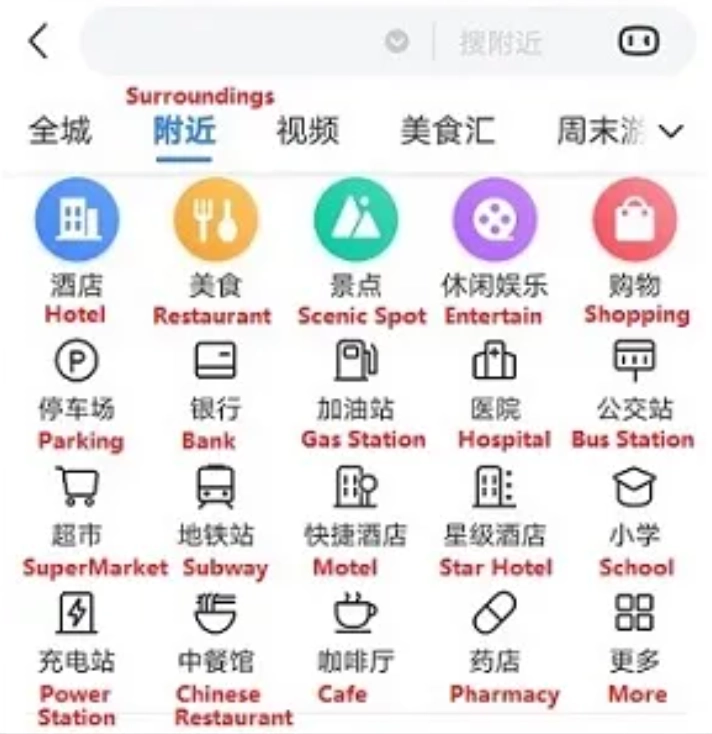
My Insider Tips for Using Baidu Maps in English Like a Local
After years of guiding, I've developed a few tricks that go beyond the manual:
- Save your hotel. Tap the star icon on your hotel's location and add it to "收藏" (Favorites). Then, no matter how lost you get, one tap guides you home.
- Use the "周边" (Nearby) feature. It's the radar icon. This is gold for finding a 24-hour pharmacy or a decent dumpling place close to you.
- Avoid the "驾车" mode unless you're in a taxi. The driving mode has a "实景导航" (AR navigation) that is actually amazing, but it eats battery like crazy. Keep it for emergencies.
- Always download offline maps for at least two cities. I've had clients get stranded in a city without internet, and the offline map saved their trip.
- Here's a controversial opinion: Don't rely on the English voice. The Mandarin voice prompts are actually clearer if you know a few numbers. Learn 'zuo' (left) and 'you' (right) and 'zhi' (straight). It takes an hour to memorize, but it'll make your life a thousand times easier.
Frequently Asked Questions About Baidu Maps in English
Verified and fact-checked by the editorial team.








Just wanted to say a huge thank you—this article turned the dreaded Baidu Map app into a reliable companion. I tried using Google Maps in Shanghai and gave up after a day. With this guide, I could type in English, get English voice directions, and even find my hotel by dropping a pin. The app's transit feature was a lifesaver during rush hour. Five stars without a doubt.
Honestly, this guide exceeded expectations. I'm usually not great with tech, but the screenshots and step-by-step instructions made it foolproof. I downloaded offline maps for Xi'an and used the app to find tiny noodle shops recommended by locals. The tip about entering coordinates saved me when an address was only in Chinese. I cannot recommend this enough.
This article is the real deal. I had to get to a factory in a suburb of Beijing for a last-minute meeting. The English Baidu Map app, set up exactly as described, gave me a precise bus + walk route. The map even showed the gate number for the factory complex. I arrived 20 minutes early. If you're doing business or traveling in China, read this.
Really solid guide. It got me through a month in Chengdu with the app in English. The only reason for 4 stars is that the 'inside mode' for subways was missing some exits, and a couple of the menu translations were inaccurate. But the core navigation, especially the bus tracking feature, was spot on. A good read before your trip.
I followed the article's steps to switch to English mode, but half the buttons still appeared in Chinese. The walking directions often sent me in the wrong direction, and when I tapped 'Search' in English, it didn't find several places that I could spell out in Pinyin. It's okay for driving, but not for walking in older parts of town. The article is written well, though—just not magic for every situation.